Memberships Purchased → HubSpot Deals
Last updated: May 29, 2026
What this is
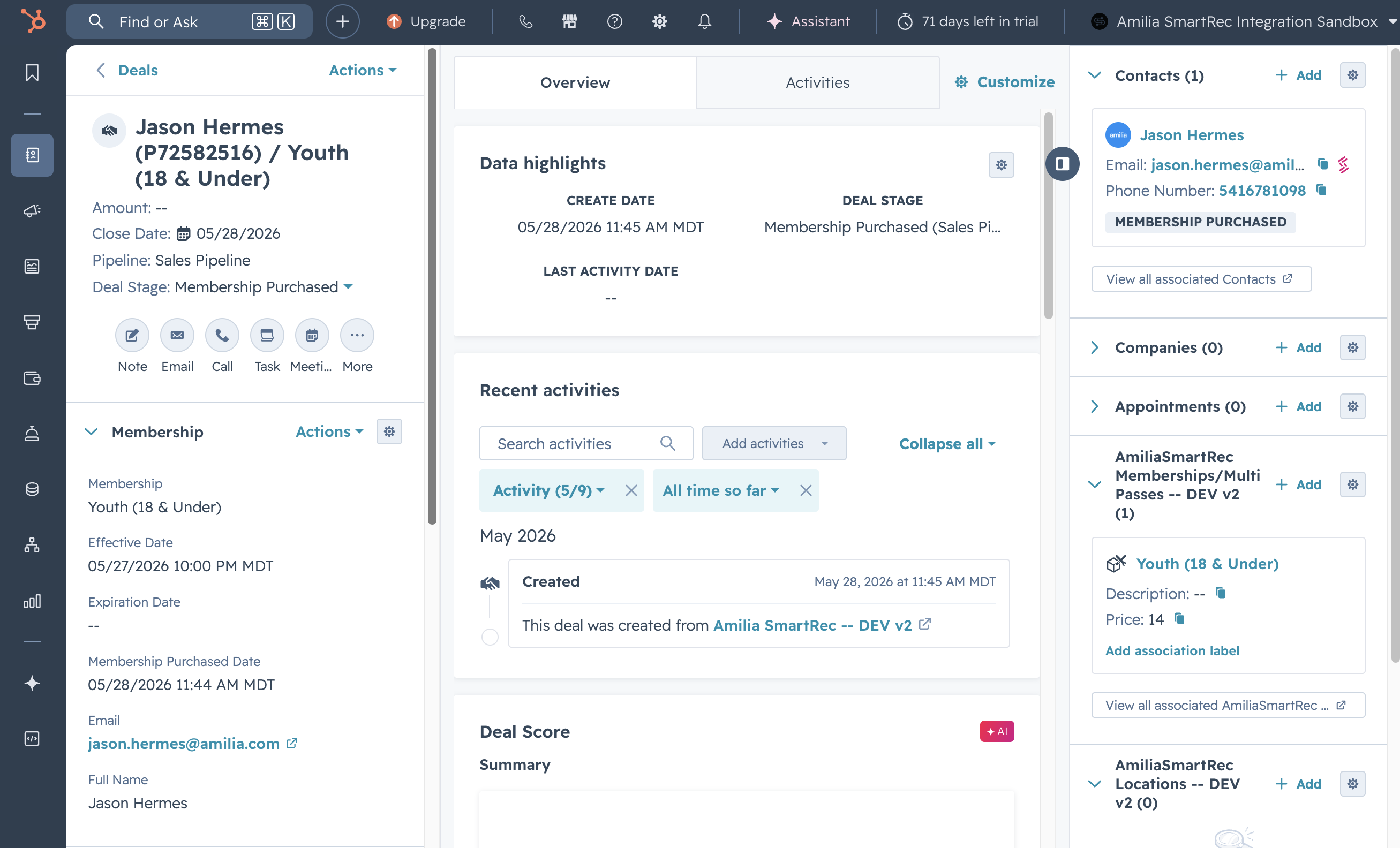
When someone buys a Membership in SmartRec, the integration creates a Deal in HubSpot in the Membership Purchased stage of the default pipeline. The deal is linked to the buyer's Contact and to the Membership product (App Object).
When it syncs
Real-time — webhook on
MembershipPurchased(Create and Delete)Historical backfill —
GET /memberships/sold, default last 30 days
Field mapping
SmartRec field | HubSpot property | HubSpot label | Property group | Type |
|---|---|---|---|---|
|
| Deal Name |
| String |
HubSpot |
| Pipeline |
| Enumeration |
HubSpot "Membership Purchased" stage |
| Deal Stage |
| Enumeration |
API |
| Close Date |
| Datetime |
API |
| Membership Invoice Item ID |
| String |
|
| Membership ID |
| String |
|
| Membership |
| Enumeration (integration adds missing options) |
API |
| Subscription ID (unique) |
| String |
API |
| Subscription State |
| Enumeration |
API |
| Membership Purchased Date |
| Datetime |
|
| Effective Date |
| Datetime |
|
| Expiration Date |
| Datetime |
|
| Person ID |
| String |
|
| Full Name |
| String |
|
|
| String | |
|
| Telephone |
| Phone number |
|
| Mobile Phone |
| Phone number |
|
| Work Phone |
| Phone number |
(sync timestamp) |
| Last Sync Timestamp |
| Datetime |
(branch) |
| Organization |
| Enumeration (select) |
Unique identifier: smartrec_subscription_id
Custom intake fields via Extra Questions
If your SmartRec memberships ask custom intake questions (emergency contact, t-shirt size, waiver signed, etc.), the integration can sync those answers as HubSpot properties on the membership deal.
How it works:
You provide a list of question name strings in the
smartrecExtraQuestionsconfiguration.For each membership webhook, the integration fetches the person's answers:
GET /memberships/{Membership.Id}/extraQuestions/{Person.Id}.Returned questions are matched against your configured list (case-insensitive, whitespace-normalized,
startsWithmatching).Matching answers are written to dynamically created HubSpot properties on the membership deal.
Property naming: Each extra question becomes smartrec_ex_{slugified_question_name} (lowercase, alphanumeric, underscores) in the smartrec_membership property group.
Answer types:
SmartRec AnswerType | HubSpot type | HubSpot field type |
|---|---|---|
| String | Text |
| Datetime | Date |
| Date | Date |
| String | Text |
| Enumeration | Boolean checkbox |
| String | Text |
| Enumeration | Boolean checkbox |
| Enumeration | Checkbox (multi-select, semicolon-separated) |
| Enumeration | Select |
| Enumeration | Select |
Note: Unmapped AnswerTypes are skipped. For enumeration types (other than boolean checkboxes), the integration adds new options to the property as it sees new answer values.
📸 Screenshot: HubSpot deal sidebar showing the smartrec_membership property group expanded, with extra question properties visible.
Associations
From | To | What it represents |
|---|---|---|
Deal | Contact | The buyer — linked by Person ID, labeled "Membership Purchased" |
Deal | App Object (Membership/MultiPass) | The Membership product they bought — linked by Membership ID |
Things to know
Close Date is set once. On webhook Update actions,
closedateandsmartrec_membership_purchased_dateare not overwritten.smartrec_subscription_statedefault options: Active, Cancelled, Paused, Expired.Delete behavior is different. A
MembershipPurchasedDelete webhook moves the deal to your configured "Membership Archived" stage rather than archiving the deal. See How Deletions & Archiving Work.