Access Scans → Person Access Scan (App Event on Contact)
Last updated: May 29, 2026
What this is
When a person checks in (or out) of one of your facilities in SmartRec, that's an Access Scan. The integration syncs each scan to HubSpot as a Person Access Scan app event on the matching Contact's activity timeline.
App Events are not CRM objects. They appear on a Contact's timeline — you can't search for them as you would a Deal or Appointment. Use them to review someone's recent check-in history, or build HubSpot workflows triggered by timeline events.
When it syncs
Scheduled — daily at 4:30 AM local time via
GET /AccessScansWindow — last 24 hours
(No webhook. No historical backfill — coverage starts the morning after setup.)
Field mapping
SmartRec field | HubSpot property | HubSpot label | Type |
|---|---|---|---|
|
| Person Name | String |
|
| Status | Enumeration |
|
| Scan Date | Datetime |
|
| Warning | Enumeration |
|
| Warning Message | String |
|
| Access Control Type | Enumeration |
|
| Responsible Name | String |
|
| Note | String |
|
| Member Number | String |
|
| Gender | Enumeration |
|
| Balance At Scan | Number |
|
| Activity Name | String |
|
| Subscription State | Enumeration |
|
| Subscription Expiration | Datetime |
|
| Membership Name | String |
How it appears on the Contact timeline
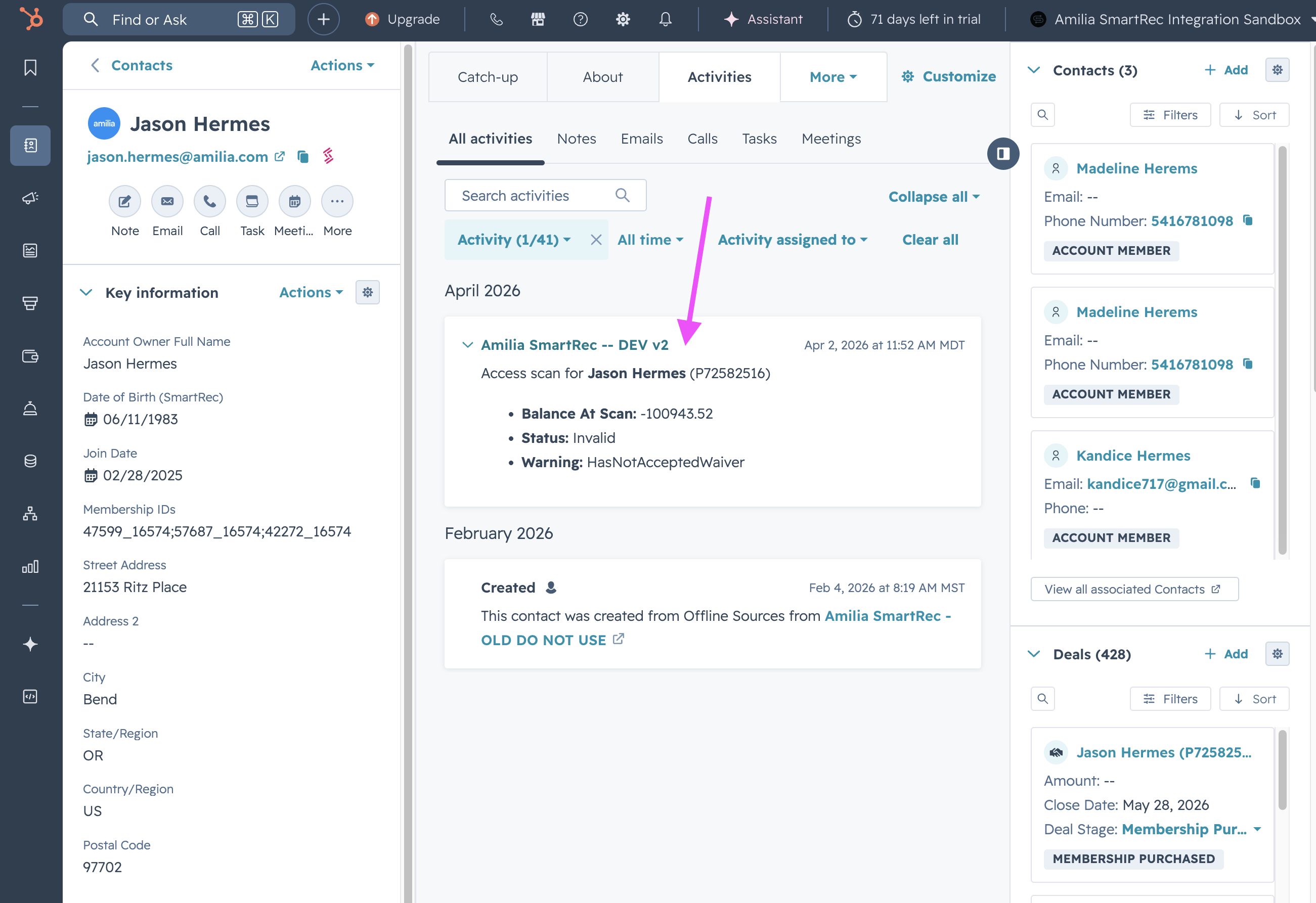
The timeline card uses this format:
Header:
Access scan for {person_name} ({member_number})Body: a bulleted list of whichever of these fields are populated:
access_control_type,activity_name,balance_at_scan,membership_name,status,subscription_expiration,subscription_state,warning
📸 Screenshot: Example Person Access Scan card on a HubSpot Contact's activity timeline.
Association
Access Scans are linked to HubSpot Contacts by Person ID.
Things to know
ScanDateis the event timestamp. HubSpot uses it to order events on the timeline.Default option values:
status: Valid, Invalid, Unknownwarning: ReviewAccount, NoWarning, HasNotAcceptedWaiver, AccessBlockedByOrgAdmin, NoActivitiesOrMembershipsOrMultipass, ExpectedBalance, NoSubscription, NoActivitiesToday, NoMultipass, NoBooking, NoPrivateLesson, ExpiredSubscriptionaccess_control_type: CheckIn, CheckOutgender: NotSpecified, Male, Female, PreferNotToSaysubscription_state: Active, InactiveCard body fields are conditional. Only populated fields show in the bullet body — empty fields are hidden, so the card stays clean.
App Event properties cannot be edited in HubSpot. Same constraint as App Objects.