How do I set up email notifications for sync errors in the SyncSmart logger
Last updated: January 16, 2026
Context
When using SyncSmart for data synchronization between systems like HubSpot and NetSuite, sync operations may occasionally fail due to data mismatches or other issues. You want an automated way to receive email notifications when sync errors occur so your team can quickly identify and resolve issues.
Answer
You can configure email alerts for sync errors directly within the SyncSmart Logger UI. Follow these steps to set up error notifications:
Navigate to the SyncSmart Logger UI
On the right side of the screen, select Actions
Click Manage Alerts

Create new alerts as needed

In the Recipients field, specify the email addresses that should receive the error notifications
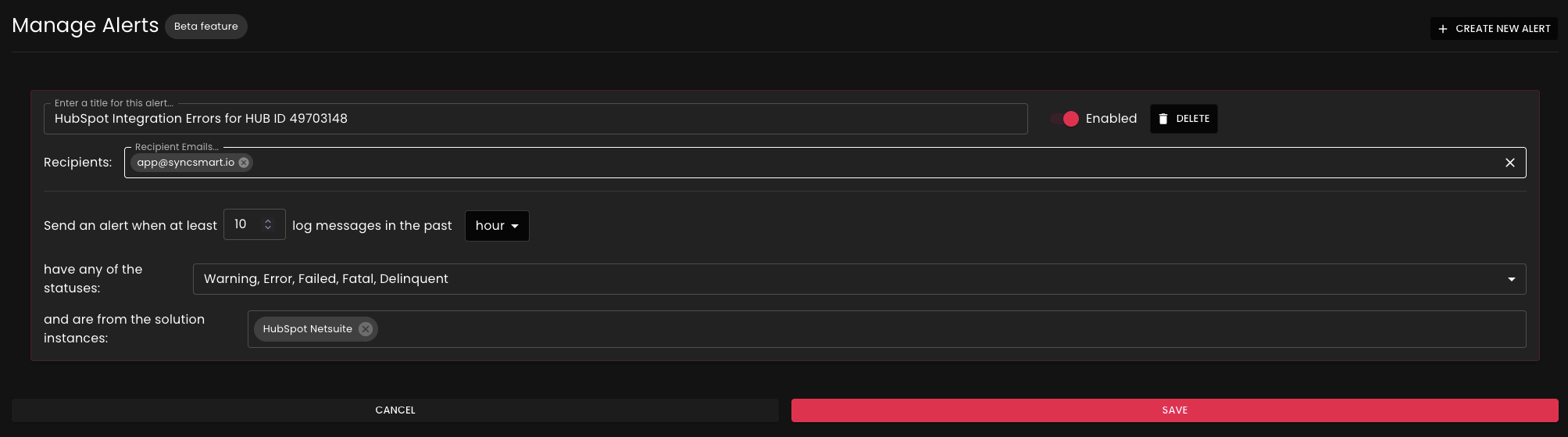
Important Note: Currently, the system does not support filtering alerts by specific objects (such as Sales Orders only). All sync errors will be sent to the designated email addresses regardless of the object type involved. Object-specific filtering is planned for a future update.
Once configured, your team will automatically receive email notifications whenever sync errors occur, allowing you to promptly address any data synchronization issues without having to manually monitor the logs.