How To Set A Default Value For Blank Fields
Last updated: November 11, 2026
The Default When NULL feature sets a default value for a field when the source system has no value. When the source field is empty, the integration writes the default value to the other system instead. It works in both sync directions, HubSpot to NetSuite and NetSuite to HubSpot.
Key Features
Configured in SmartHub: You enable and configure Default When NULL on a field mapping in SmartHub (hub.syncsmart.io).
Both directions: Defaults can be set for HubSpot to NetSuite and for NetSuite to HubSpot mappings.
Supported field types: Text, dropdown, and number fields.
Prevents empty values: A default is applied wherever the source value is blank.
How It Works
Open the field mapping in SmartHub: Sign in to SmartHub, open the object mapping, and locate the Default When NULL option on the field mapping.
Select the target field: Choose the field mapping that should receive a default value when the source value is empty.
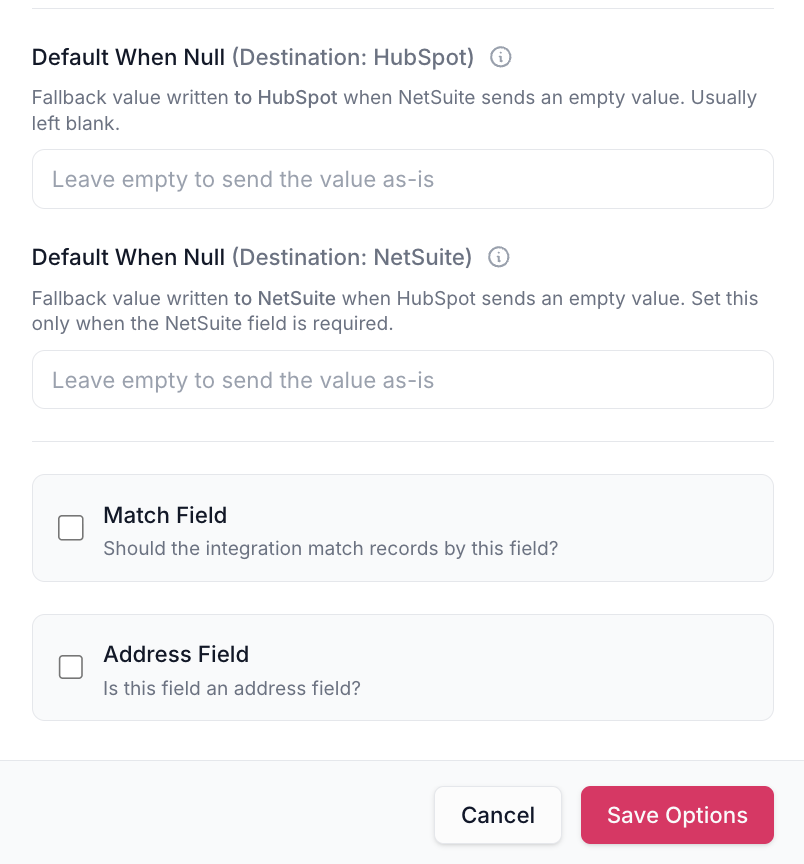
Define the default value: Enter the default text, select a dropdown option, or specify a numeric value.
Save and deploy: Click Save changes, then Deploy to publish the change (Save alone only stores a draft). Save after each field mapping change. Once deployed, the integration applies the default value whenever the source field is empty.
Example Use Case
A customer wants every new company created in HubSpot to be assigned a subsidiary in NetSuite. If the subsidiary field is empty in HubSpot, Default When NULL assigns a predefined subsidiary value.
Limitations
Only applicable to text, dropdown, and number fields.
The default value must be configured on the field mapping in SmartHub.