Resolving phone number formatting sync errors between your integrated system and HubSpot
Last updated: September 26, 2025
If you're experiencing sync errors when trying to sync contacts from your CRM to HubSpot, and the errors are related to phone number formatting, this is likely due to HubSpot's phone number validation settings.
Understanding the Issue
HubSpot has a phone number validation feature that expects phone numbers to be in full international format. When an integrated system (such as Dynamics or Netsuite) sends phone numbers in formats like "(301) 294-4055", HubSpot may reject them if the validation is enabled, causing the record sync to fail.
Solution Options
You have two main options to resolve this issue:
Option 1: Disable Phone Number Validation in HubSpot (Recommended)
Navigate to your HubSpot property settings
Search for the "Phone" property
Edit the phone property settings under "Property Rules"
Turn off the autoformatting/validation feature
This is what the setting would look like in HubSpot:
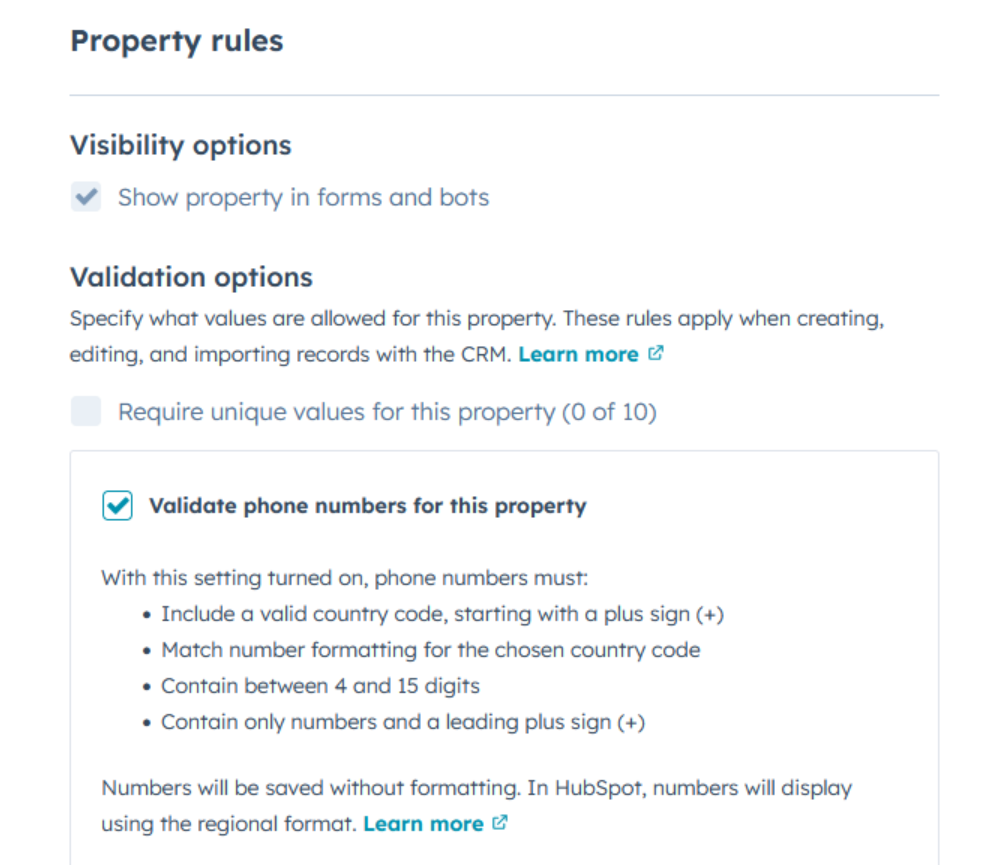
This will allow phone numbers in various formats to sync successfully from NetSuite to HubSpot.
Option 2: Format Phone Numbers in NetSuite
Alternatively, you can ensure that all phone numbers in your CRM follow international formatting standards (e.g., +1-301-294-4055) before syncing to HubSpot.
Verification
After implementing either solution, test the sync with a contact that previously failed to ensure the phone number formatting issue has been resolved.