NetSuite + HubSpot Integration Overvie
Last updated: January 21, 2026
Introduction
This document describes SyncSmart’s integration between HubSpot and NetSuite.
It covers key terminology, features, capabilities, security, FAQs, and more, with definitions specific to NetSuite, HubSpot, and SyncSmart.
What is NetSuite?
NetSuite, by Oracle, is a cloud platform used to manage business finance, operations, accounting, and customer relationships. It combines:
• Customer Relationship Management (CRM)
• Enterprise Resource Planning (ERP)
For example:
• A sales team might use the CRM functionality to manage leads and opportunities.
• An accounting team might use the ERP functionality for post-sale invoicing, reporting, and other financial activities.
SyncSmart supports object mapping for companies that use NetSuite as a CRM and can also provide custom functionality for companies using NetSuite primarily as an ERP.
What is HubSpot?
HubSpot is a cloud platform used to manage:
• Marketing
• Sales
• Operations
• Customer service
It includes CRM functionality as well as tools for:
• Content Management (CMS)
• Marketing automation
• Operational automation
For example, HubSpot tracks and automates a contact’s journey from their first interaction with your website or marketing campaigns through to deal close and into customer support.
What is SyncSmart?
SyncSmart.io is a cloud-based Integration-as-a-Service (IaaS) provider.
SyncSmart:
• Offers a variety of integrations and products, from self-service to fully managed support.
• Is a top-tier partner with direct access to high-level engineering support.
SyncSmart’s goal is to help companies align their tech stack so they can scale operations and achieve measurable marketing and sales success.
Integration Overview
How These Systems Work Together
SyncSmart’s HubSpot + NetSuite integration provides bidirectional syncing of:
HubSpot Object | Netsuite Object | Unique Identifier |
Company | Customer | Internal ID, domain |
Contact | Person Customer | |
Contact | Contact (NetSuite) | |
Deal | Transaction | Transaction ID |
Deal | Opportunity | Internal ID |
Deal Line Item | Line Item | Internal ID |
Product | Product/Item | Internal ID |
Engagement | Activity | Internal ID |
General rules: people/accounts match by email or internal ID; transactional data matches by transaction ID; everything else by unique internal ID.
Field support: standard and most custom fields supported when populated and types are compatible; virtual/calculated fields are not; engagement fields are predefined.
Including field-level data between HubSpot and the corresponding NetSuite objects.
Benefits of the HubSpot + NetSuite Integration
For customers using both HubSpot and NetSuite, SyncSmart helps:
• Enable behavior-based marketing campaigns
• Consolidate reporting and sales activity tracking
• Improve customer nurturing
Common HubSpot + NetSuite Integration Definitions
API (Application Programming Interface)
An API allows software applications to communicate with one another.
In this context, APIs allow HubSpot and NetSuite to exchange data automatically.
Bidirectional Sync
A sync pattern where data flows both ways between systems—in this case, between HubSpot and NetSuite—so that updates in one system are reflected in the other.
Closed-Loop Reporting
A reporting approach that combines marketing and sales data to show the complete customer journey from first touch through revenue, enabling ROI analysis and optimization.
Default Match Field
The primary field(s) the integration uses to match records between HubSpot and NetSuite.
Examples:
• Company ↔ Customer: Internal ID or domain
• Contact ↔ Customer (Person): Email
If the default match field is missing or mismatched, records may not sync as expected.
Domain
The address of a website (e.g., example.com), which corresponds to a physical location on a web server.
In this integration, domains are one of the match criteria between HubSpot companies and NetSuite customers (alongside internal IDs and transaction IDs).
Fields / Properties
Fields (HubSpot “properties”) store information for objects such as companies, contacts, deals, and custom objects. Examples:
• Contact information (name, email, phone)
• Deal information (amount, stage, close date)
• Customer attributes (industry, lifecycle stage)
SyncSmart supports almost all standard and most custom fields for all integrated objects, as long as:
• The fields contain data
• The data types are compatible between HubSpot and NetSuite
Internal ID
In NetSuite, every record (customer, status, contact, transaction, etc.) has a unique internal ID (an integer), which serves as that record’s primary key and never changes for the life of the record.
HubSpot records also have internal IDs, which uniquely identify companies, contacts, deals, and other objects.
Custom Object
A custom object allows you to model additional data types beyond standard objects (e.g., subscriptions, assets, memberships) when standard HubSpot or NetSuite objects are not sufficient.
Objects
Objects represent different types of data in your CRM/ERP, such as Contacts, Companies, Opportunities and Deals.
Transaction ID
In NetSuite, transactions (e.g., sales orders, invoices, etc.) are records with a unique transaction ID. These IDs are used to:
• Match transactions to HubSpot deals
• Maintain accurate connections between revenue records in both systems
Webhook
A webhook is a lightweight, event-driven mechanism that enables one system to send data to another when a specific event occurs (for example, when a record is created or updated in NetSuite).
Workflows
Workflows automate processes by triggering actions based on conditions and context. They can be built in both Netsuite and HubSpot to enhance and optimize business processes enabled by the integration.
Example:
If a lead books a demo, a workflow might automatically create a deal, send a follow-up email, and assign a task to a sales rep.
HubSpot + NetSuite Integration Features & Capabilities
What Happens When Data Changes
When a record is created or updated in HubSpot, SyncSmart detects the change and syncs it to NetSuite.
When a record is updated in NetSuite, SyncSmart sends the update back to HubSpot.
Sync timing depends on record type and dependencies but typically completes within minutes.
Customers do not need to manually trigger syncs during normal operation.
Sync Frequency and Dependencies
- Checks for new/updated data about every 5 minutes.
- Processing is typically ~30 seconds per record; expect 5–10 minutes end-to-end under normal load.
- Dependencies (e.g., a company/contact before a transaction) can affect timing.
- No manual triggers needed under normal operation.
Some objects have dependencies that affect when they sync. For example, certain transaction records may depend on related company or contact records syncing first.
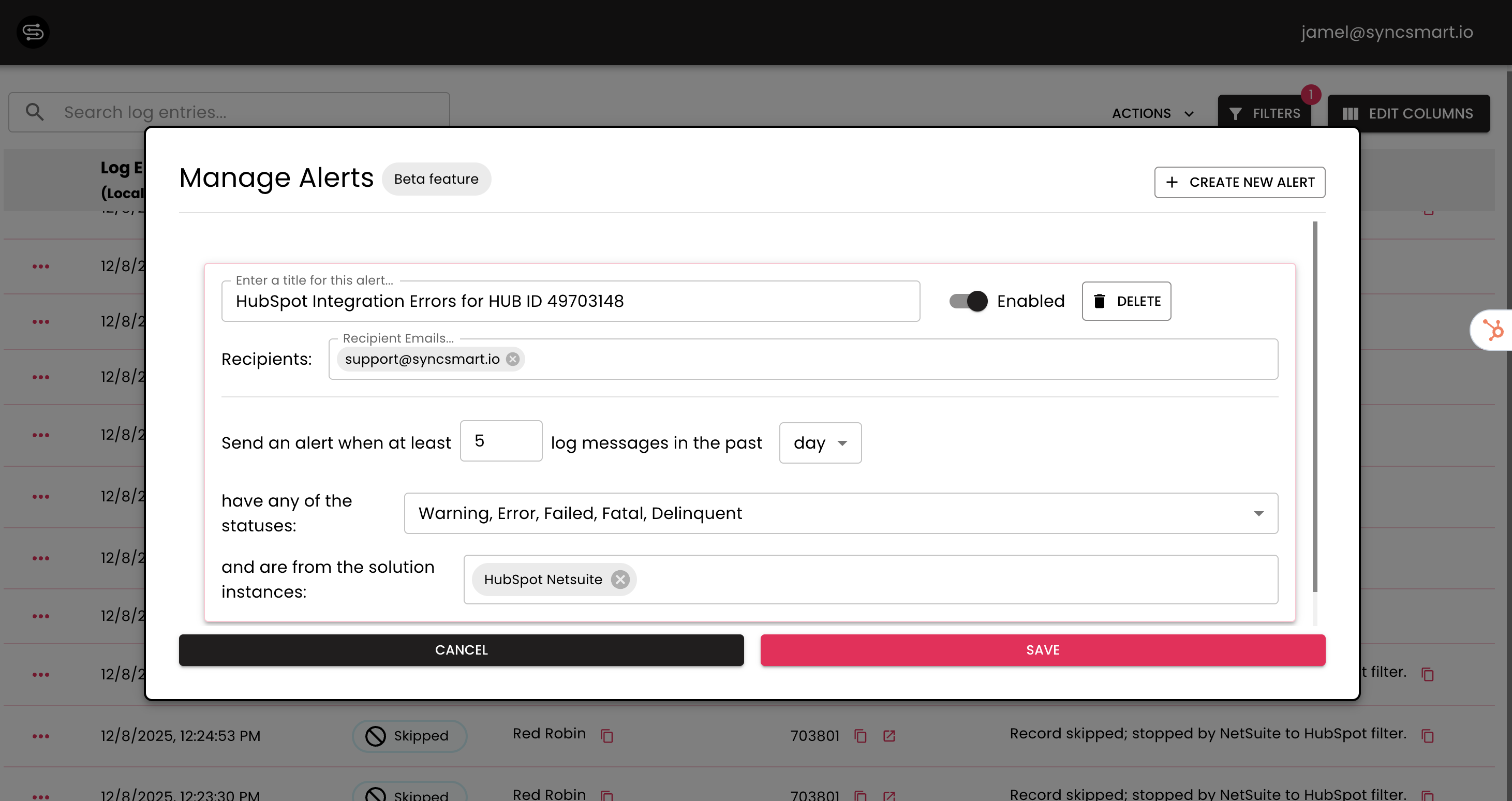
SyncSmart uses the SyncSmart logger to monitor the platform in real time and send alerts when issues are detected.
Associations
Associations define relationships between records (e.g., which companies are linked to which deals or contacts).
In HubSpot:
• Associations are visible on the right-hand side panel of a record.
• They are differentiated by labels, which appear on association cards.
• There are primary and flexible (non-primary) associations.
Association labels fall into three categories:
• Any / Every association: Unlabeled relationships (e.g., deal_to_company_unlabeled)
• Primary association: The main relationship (e.g., primary company on a deal)
• Labeled association: Custom labeled relationships (e.g., end_user, portal_admin)
Note: Labels do not need to match display names.
Mapping Primary Associations
Primary associations are handled automatically in the integration.
HubSpot → NetSuite:
• The first (primary) association in the payload is taken and added to the entity field of the upsert payload.
Distinguishing Primary vs Flex Associations
SyncSmart uses the HubSpot field type association as a signal to treat fields as “special” in mappings.
• Field names correspond across systems.
• HubSpot field type is set to number.
• HubSpot type is set to association to indicate flexible association behavior.
Filters on Standard and Custom Fields
When syncing from HubSpot to NetSuite, the integration can filter based on any combination of standard and custom fields.
• Filters are implemented in JavaScript by SyncSmart developers.
• Clients provide filter criteria in plain English to their Implementation Consultant.
Standard filters are always applied before syncing to prevent invalid or incomplete data from flowing.
When syncing from NetSuite to HubSpot, filters are typically implemented via NetSuite User Event Scripts.
Syncing Custom Objects
For HubSpot Enterprise portals with custom objects, SyncSmart can configure a bidirectional sync between:
• A custom record type in HubSpot
• A custom record type in NetSuite
To enable custom object sync, the SyncSmart team will:
1. Enable the HSNS configurator and define custom record objects from NetSuite and HubSpot in the middleware installation wizard.
2. Set up mappings in Google Sheets (with some manual adjustments).
3. Run the “GSheet to JSON Config” job in the configurator’s solution instance.
For more information, please contact your Implementation Consultant or SyncSmart Support.
The SyncSmart Bundle and HubSpot iFrame
Once an integration project begins, SyncSmart installs a NetSuite bundle.
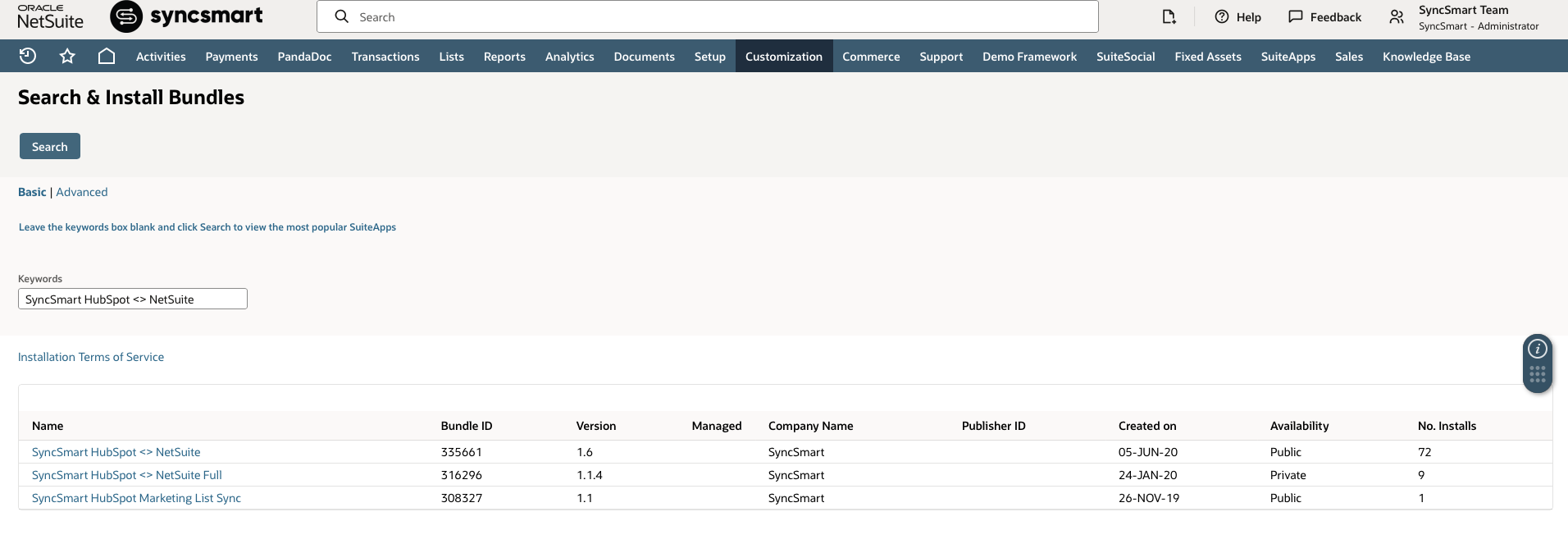
You can find it in NetSuite under:
Customization → SuiteBundler → Search & Install Bundles → List → “SyncSmart HubSpot <> NetSuite”
This bundle includes:
• Scripts for webhook events and RESTlet functions
• Components that enable performant, event-driven integrations
Sandbox Considerations
If you refresh a NetSuite sandbox before repointing SyncSmart to production:
• The SyncSmart bundle is removed from the sandbox.
• This may require re-installation and could add cost and time.
Important:
Do not refresh NetSuite sandboxes during implementation without coordinating with SyncSmart.
If a sandbox is refreshed:
• The SyncSmart Webhook URL from production is copied into the sandbox.
• This can cause duplicate records if the sandbox starts sending data to the live integration.
• Someone must clear the SyncSmart Webhook URL from the sandbox instance.
HubSpot iFrame
The bundle also includes a HubSpot iFrame:
The bundle adds a “HubSpot SyncSmart” tab on the preferred Contact form.
Shows the 5 most recent HubSpot activities and a link to the full timeline.
NetSuite users need a HubSpot login to view the timeline.
Expected on-record info: timeline preview, link back to the HubSpot record, mapped HubSpot properties on the SyncSmart tab.
Where HubSpot Data Appears in NetSuite
SyncSmart installs a custom record type and supporting fields in NetSuite to store HubSpot-related data.
Customers can expect:
A dedicated SyncSmart / HubSpot tab on NetSuite records
Visibility into recent HubSpot timeline activity
Linked references back to the full HubSpot record
This allows NetSuite users to view sales and marketing context without leaving NetSuite.
Optional Add-On: HubSpot Sandbox Environment
Customers can request a HubSpot sandbox environment managed by SyncSmart to:
• Test new integration functionality
• Experiment with mappings and workflows
This allows testing without impacting the live integration or production environment.
Discuss sandbox needs with your Implementation Consultant before or during installation.
Avoiding Duplicate Companies Between HubSpot and NetSuite
- Set NetSuite Internal ID as a match field in the SyncSmart mapping.
- Create/load a HubSpot Company "internal ID" property with NetSuite IDs before running a historical sync.
- Then run the historical sync so existing records match on internal ID and avoid duplicates.
Data Security
- Point-to-point; 256-bit AES encryption in transit and at rest; data stored in US data centers.
- Authentication: HubSpot OAuth; NetSuite credentials encrypted in SyncSmart middleware.
- Tokens can be revoked for security.
Implementation Process
Customers may choose self-service or guided implementation depending on internal resources and complexity.
1. Self-Service (SyncSmart UI)
• Customers can configure the integration themselves via the SyncSmart UI.
• SyncSmart support is available as needed.
2. Guided Implementation (Implementation Consultant)
A typical consultant-led implementation includes:
• Kickoff Call
• Introductions and roles
• Review of integration use cases
• Presentation of object and field mappings
• Discussion of dropdowns, owner fields, and match logic
• Configuration & Build
• Finalizing mappings and filters
• Installing the SyncSmart NetSuite bundle
• Building and validating the sync flows
• Launch & Historical Sync (optional)
• Launching the live sync
• Running an optional historical sync to bring in pre-existing data
• Post-Launch Support
• Ongoing managed services and support as needed
For more details on managed services and the NetSuite + HubSpot integration, refer to SyncSmart’s support and product documentation or contact your SyncSmart representative.