ConnectWise User Guide
Last updated: September 25, 2025
Introduction
This document describes SyncSmart’s integration between HubSpot (sometimes referred to as HS) and ConnectWise Manage (referred to as just ConnectWise/CW throughout this documentation). Terminology and definitions will be specific to ConnectWise, HubSpot, and SyncSmart and will cover features, capabilities, security, FAQs, and more.
What is ConnectWise?
ConnectWise is a professional services automation tool. It has the functionality of customer relationship management (CRM) software, plus features that are commonly used by managed service providers (MSPs) in the IT industry.
What is HubSpot?
HubSpot provides cloud software to manage marketing, sales, operations, and customer service. It has the functionality of customer relationship management (CRM) software and content management system (CMS), marketing automation, and operational software. For example, HubSpot tracks and automates the journey a contact takes from when they first interact with the company’s marketing campaigns and website to the point sales closes the deal and customer service begins offering support.
What is SyncSmart?
SyncSmart.io is a cloud-based Integration-Platform-as-a-Service provider, backed by Lynton, a HubSpot Elite partner. SyncSmart is the product arm of Lynton, providing a variety of integrations and products that range from self-serviced, packaged integrations to managed support packages. The integrations connect data from HubSpot accounts with CRM or ERP accounts in a bidirectional or one-directional sync.
What Powers SyncSmart?
SyncSmart is powered by iPaaS middleware and JavaScript technology, using a middleware OEM framework for SaaS companies to integrate with a wide variety of cloud software, databases, and files.
SyncSmart’s first UI, a web application users log into via my.syncsmart.io, is now available for ConnectWise and will soon be available for all integrations.
How Does CW + HS Work Together?
SyncSmart has created a HubSpot ConnectWise integration that offers bidirectional syncing of HubSpot companies, contacts and deals with their respective objects in ConnectWise. Bidirectional syncing means that what happens in one system will happen in the other. For instance, if you create a contact in HubSpot, it will automatically show in ConnectWise and vice versa.
How Does SyncSmart Protect HubSpot and ConnectWise Data?
SyncSmart integrations are designed for performance, accuracy, reliability, and security. They are point-to-point integrations that transmit data between systems without mirroring to a data warehouse for analysis, which results in secure syncing. Data is encrypted with 256-bit AES encryption and located in data centers in the United States. SyncSmart uses OAuth and machine-to-machine authentication when applicable, and reserves the right to revoke HubSpot OAuth token-based authentication at any time. SyncSmart’s platform is also SOC 2 Type 2 compliant and each customer is hosted within a separate, secure customer account with their connector authentications, data cache, and integration runtimes.
The Benefits of The Integration
SyncSmart’s technology helps companies using HubSpot and ConnectWise provide their teams with the most accurate, up-to-date data necessary to achieve real business growth. Specific benefits and features include:
Unified platform, connecting disparate data sources and improving sales and marketing teamwork
Elimination of manual work through automated tasks and communication
Data entry in one platform, reducing errors and saving ample time
Enhanced insight for sales and marketing into each other’s teams
Control of what objects and fields sync (all standard and custom fields are supported by SyncSmart technology)
Stronger lead scoring and prioritization for sales representatives
Complete visibility into sales pipelines and opportunities for better reporting
More personalized, contextual, segmented, and automated marketing emails
Knowledge of a customer’s entire journey and proof of ROI through closed-loop reporting
Bidirectional sync helps flatten tech stack and enable real-time communication
Integration firing in the background every few minutes
Real-time monitoring of the SyncSmart integration platform
Supported by a multi-step, multi-level security system
Completely software-free, eliminating the need to learn or license a new system
A comprehensive library of other integrations, apps, and products from SyncSmart
Full HubSpot agency offerings ranging from web design and development to inbound marketing strategy, from Lynton, SyncSmart’s parent company
Common Integration Definitions
API
Application-Programming Interface (API) helps software developers design products that automatically connect to CRM like HubSpot’s. It means that a business can integrate previous data and start using CRM right away.
Company
Companies are standard HubSpot integration objects. They help the CRM distinguish between different companies, and store information properly so it can be reached when necessary. They also contain data like addresses, opportunities, etc.
Contact
Anyone who interacts with your company can be saved as a contact in HubSpot or ConnectWise. In ConnectWise, there is a specific object for Contact Activity to see how that person is interacting with your business collateral.
Bidirectional sync
Bidirectional sync helps get information both from HubSpot integration, and a business’s own data. APIs communicate that information, and bidirectional syncs are “bridges” that help them reach one another.
Closed-loop reporting
Closed-loop reporting helps consolidate the data that marketing teams are collecting with the data that sales are collecting.
Connector
Connectors are integrations that use bidirectional sync to connect HubSpot CRM with an external system. This means that data is stored in a central hub, eliminating multiple logins or shuffling between systems.
CRM
Customer relationship management (CRM) is a set of processes and tools that help businesses build a better relationship with customers. ConnectWise and HubSpot are CRM tools that are extremely beneficial as they help improve data collection and application.
Deal pipeline
Deal pipelines predict revenue and identify problems in sales. Each pipeline has multiple stages through which the customer typically has to progress in order for the deal to be closed.
This is done automatically with HubSpot integration.
Deal stages
Deal stages are parts of the standardized deal pipeline process.
For example, when a customer reaches stage #3, they can be offered a demo or a proposal. Deal stage features in HubSpot integration simplify the process for the sales team, and allow streamlined customer onboarding.
Default match field
The default field / field property that the integration uses to match records between the CRM/ERP and HubSpot.
Fields or properties
Fields or properties are information storages about companies and other objects. They can include contact information, deal stage, and any other information needed to improve marketing and/or sales. SyncSmart can support almost all standard and custom fields (ones that do not exist in the standard form, are unique to a business, and must be created) for all objects available in an integration. Here are examples of the details that can be synced on customer, contact, and deal objects.
Filter
Filters are an easy way to search, sort, group and analyze objects, fields, and mappings.
Identifiers
All objects in ConnectWise have a rec ID or identifier. The rec ID is automatically assigned and is always a number. In the API, it has a key id.
For companies, there is also an alphanumeric identifier for companies. It is always unique, and is entered by the user (or generated by the integration). On the screen, it’s labeled "Company ID." In the API, it has a key identifier.
Implementation consultant / process
SyncSmart offers an implementation process to build and ensure integrations are working to meet a business’s specific needs. The implementation consultant, alongside a team of others, will guide the customer throughout a series of Zoom calls and Google spreadsheets.
Integration as a service
Integration Platform as A Service (iPaaS) is a cloud service that supports application, data and process integration. It combines multiple applications, sources, APIs and systems to create a central, accessible hub.
Leads and contacts
In HubSpot, leads and contacts are one and the same. However, they are different in CRM. Leads are sales prospects. They’re usually the first stage in the deal pipeline, as they’ve yet to be convinced to become your customer. Once a lead progresses through the deal pipeline and becomes more qualified, it turns into a contact.
Objects
Objects, like contacts, companies, opportunities, and more, represent the different types of relationships and processes a business has. CRMs and HubSpot both have standard objects to perform various sales and marketing functions. SyncSmart integrations sync all standard objects and their associated fields.
Opportunities and deals
Deals in HubSpot integration help identify opportunities for increasing revenue by boosting leads down the sales funnel. For example, companies can create a deal when a lead takes an important action such as booking a demo.
Sync / data synchronization
Data synchronization is the ongoing process of synchronizing data between two or more devices and updating changes automatically between them to maintain consistency within systems. Syncing refers to the process of flowing data between HubSpot and the CRM/ERP.
Webhook
A webhook is a lightweight API that powers one-way data sharing triggered by events. Used with an API, they enable applications to share data and functionality.
Workflows
Workflows are a way of automating processes by triggering relevant actions based on context. For example, if a lead books a demo, they can be automatically sent a deal.
HubSpot ConnectWise Integration Features & Capabilities
Below is a list of objects synced between HubSpot and ConnectWise and the fields that SyncSmart supports by object:
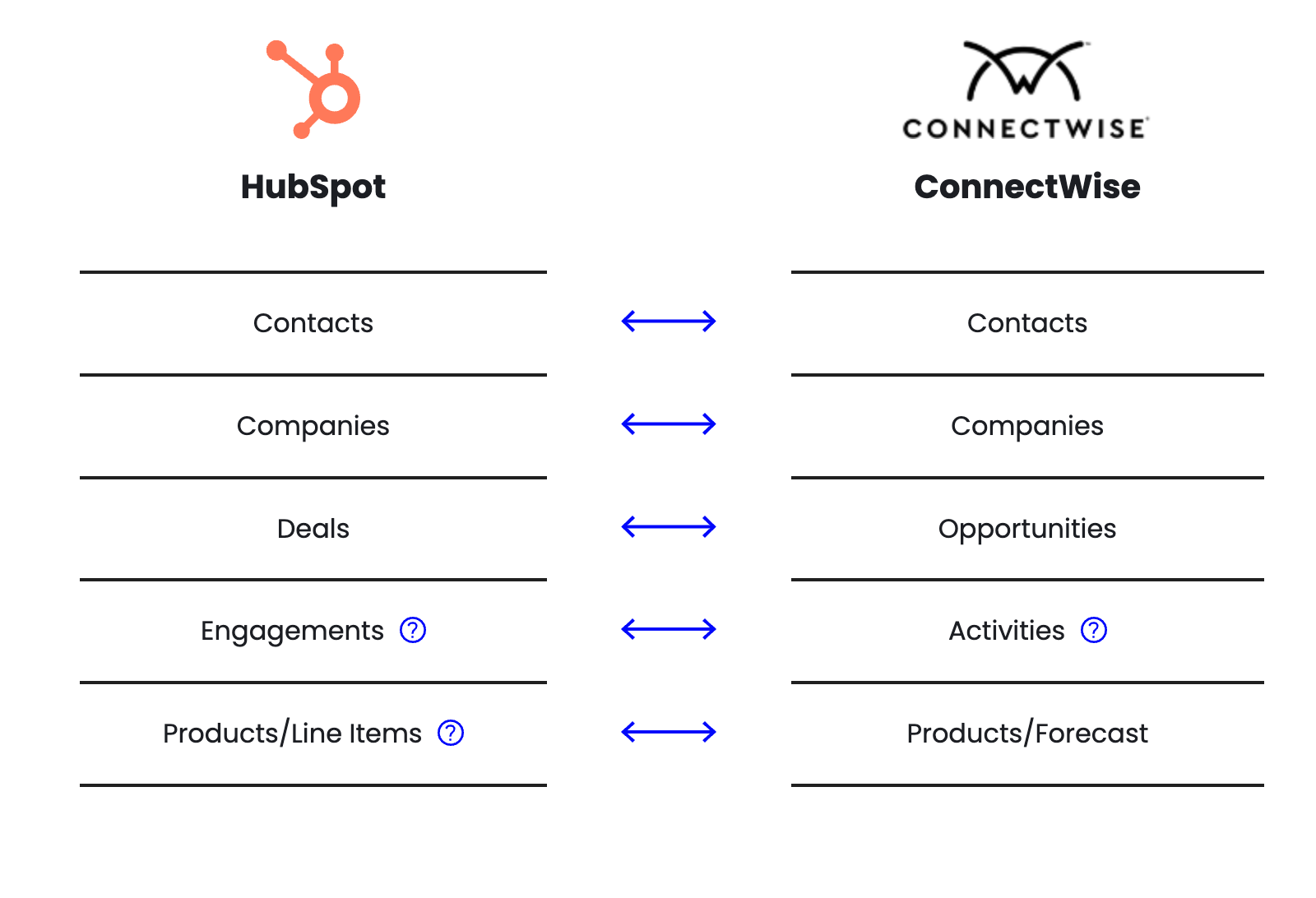
A more detailed look:
Fields
All standard and custom fields that contain data ARE supported by SyncSmart. For example, HubSpot contacts fields like stress address, name, and description will sync. However, they MUST have data to sync. If the field doesn’t have data or the field doesn’t exist on a different record type, it will not sync.
An example here: “Abandoned cart” would display on a customer record but because it doesn’t actually contain data, just simply shows there, the integration can’t map it. Additional example: A field text cannot sync to a dropdown. Workarounds can be built though.
Additionally, for object and field mapping to work, customers must have compatible objects and fields. For example, customers cannot map a date field to a number field but can map a date to a date. Contact objects can map to other contact objects (or the same object with a different name in the CRM) but not contact to deal. Using the SyncSmart UI will eliminate any issues from object or field mapping.
Syncing Frequencies and Monitoring
For the ConnectWise integration, customers should have the expectation that it takes a minimum of five minutes to sync a record, with a maximum time of 10 minutes under normal working conditions. Some dependencies that may affect this in the ConnectWise integration include:
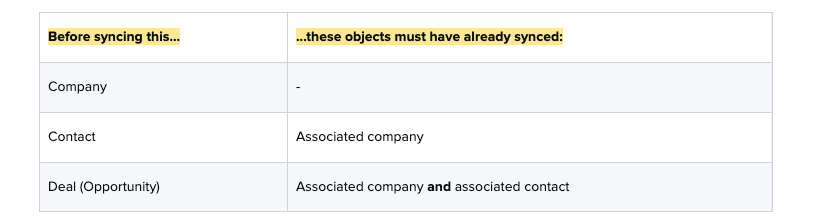
While ConnectWise does allow contacts to be created without a company, the integration requires that all contacts be tied to a company. It is not standard practice for ConnectWise customers to have contacts that do not have a company assigned to them. For opportunities, ConnectWise requires a single company and a single contact to be associated with each opportunity, which explains the reason for those particular dependencies.
It is also important to note that SyncSmart uses DataDog to proactively monitor the integration platform in real-time to look for any sync downtime or other issues. The team sends out alerts and notifications as needed. If the SyncSmart team sees an error, they will investigate as soon as possible. If an integration does go down, it should pick up where it left off when the issue is corrected.
Filters
When syncing from ConnectWise to HubSpot, the integration can filter on any combination of standard or custom fields. These filters are written by the integration developers as JavaScript code. Additionally, a set of standard filters are always applied before syncing. These standard filters are described below:
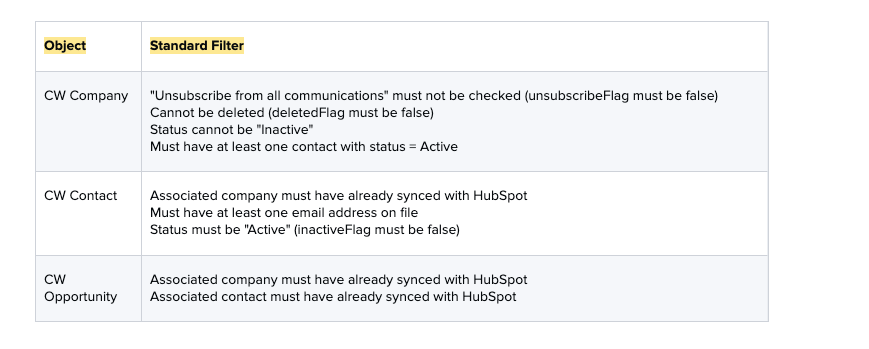
The SyncSmart UI and ConnectWise
SyncSmart integrations use a middleware platform to integrate HubSpot with another system, generally a CRM, known as the target system. Almost all of these integrations allow customers to have their own set of field mappings between HubSpot and the target system.
The SyncSmart UI provides a way for customers to input custom field mappings through a web application - my.syncsmart.io. Customers who have ConnectWise can now use the UI. By allowing customers to do this, developers at SyncSmart are able to spend more time designing products, and less time setting up integrations for customers.
Specific things users can do with the UI:
manage and review field mappings for ConnectWise
obtain a set of default field mappings, then review and modify them
add custom field mappings
remove field mappings
control the direction in which data syncs (HubSpot -> ConnectWise, ConnectWise -> HubSpot, bi-directional)
enter filter criteria
However, the UI does not display any statuses or logs pertaining to the integration. That information is still tracked by the SyncSmart team.
Below is an example of the UI, looking at HubSpot contact to ConnectWise contact:
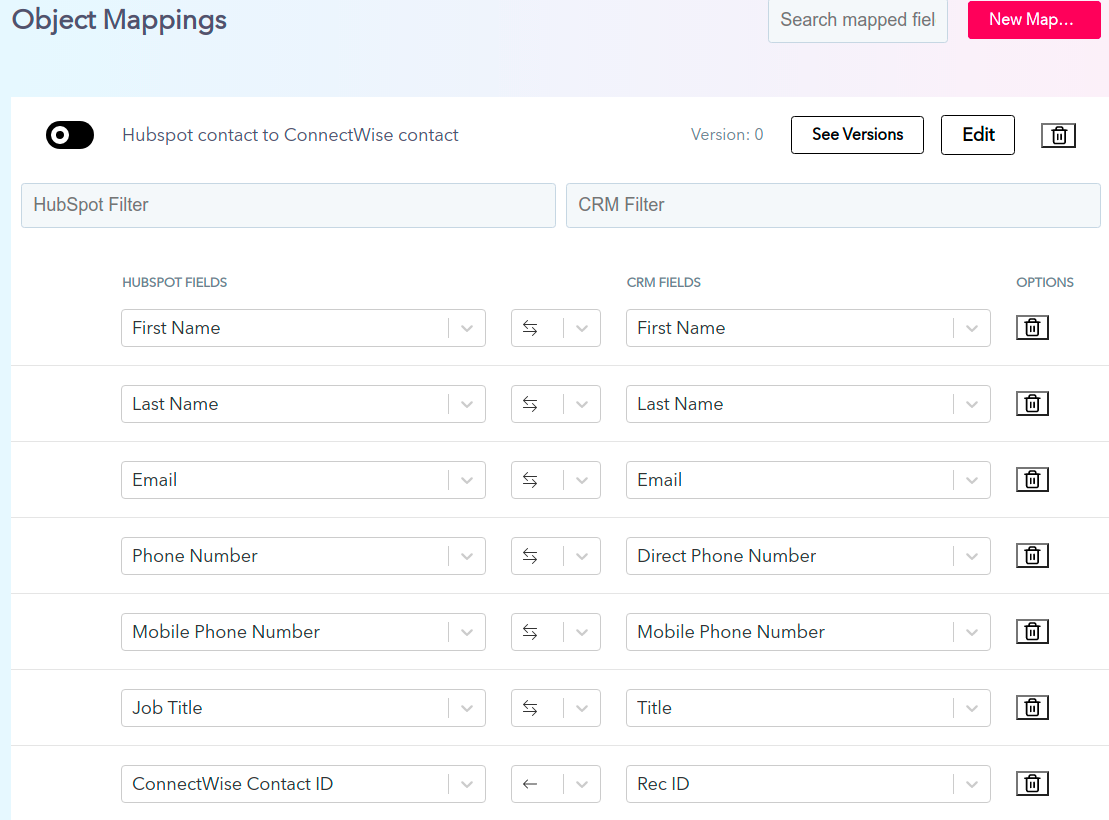
The Implementation Process
With the ConnectWise beta using the SyncSmart UI, a customer can stand up this integration on their own with the help of the SyncSmart team, and reach out for support as needed. However, despite having a UI option, users must go through SyncSmart’s standard implementation consultant process at the moment. That looks like:
Kick off call to introduce the team, confirm use cases, present object mapping and field mappings, discuss dropdown and owner fields, and more.
Close the loop on any clarifications or questions and install mappings, including filters, and build out the sync.
Perform extensive User Acceptance Testing (UAT) with the customer and the SyncSmart team, launch the integration with an optional historical sync to get up and running with pre-collected data.
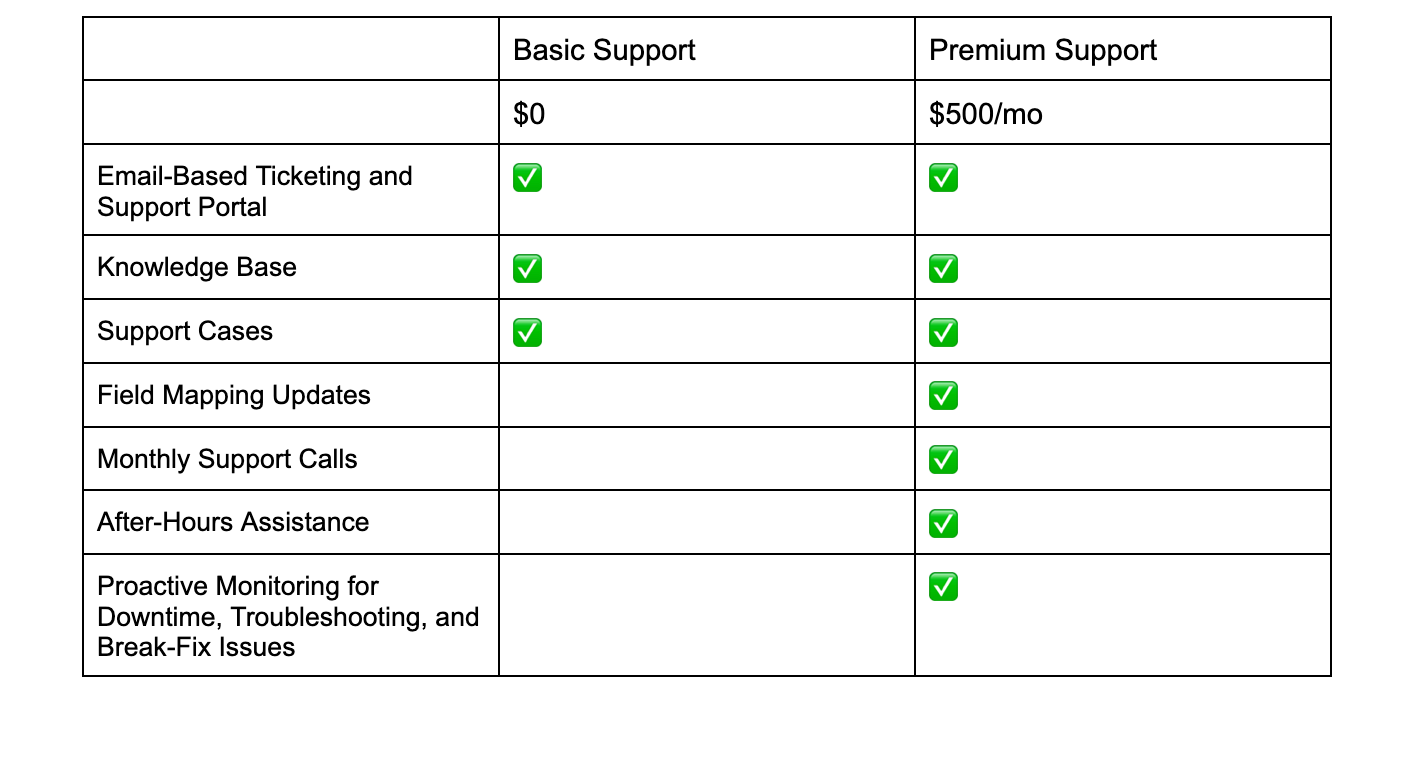
Offer ongoing support as needed through managed services and support and premium support packages.
Note: Customers going through the implementation process can expect to launch their integrations within six to 12 weeks – which is based on the customers being involved heavily throughout the process. If a user is not responsive to certain phases of the implementation process - particularly the UAT phase, the timeline can be stalled and nearly halted, resulting in a bogged-down integration launch. To ensure the timeline meets the customer's and SyncSmart’s expectations, consultants should address the importance of open communication and collaboration in the initial kick-off call and continue to address it throughout the process.
Examples of support packages:
Note: The beginning of any integration starts with a customer finding the ConnectWise integration using the Marketplace Installer. When a customer finds it directly on the HubSpot app marketplace, they will be directed to the Marketplace Installer where they can register, fill out billing information if needed, and configure the integration and connect their systems. The Marketplace Installer communicates with various middleware workflows to make all of this happen. After the customer completes this process, they’re given a solution instance in the middleware SyncSmart uses for the integration they installed.
Reminder: Whether a customer uses the marketplace installer, the UI, or by reaching out to a SyncSmart team member, they will have to go through the implementation process on top of installing it on their own. Being involved with the SyncSmart team will speed up the process and help customers go live quicker.
Speak with an Integration Expert
Have additional questions or need help with a product? Talk to the SyncSmart team today.